DevX Group LLC sets up an AI receptionist on your business line with you. It answers calls, takes messages and books appointments, for $299 a month.
The speech and language models run on a Mac. Call audio reaches that Mac through our phone carrier and media service, named in the privacy policy. For offices and service businesses in San Diego, Orange County and nearby.
Answers calls, takes messages and books appointments in a connected Cal.com calendar.
Your business information. Your greeting. Your approved answers.
Appointments need a connected Cal.com calendar.
Your business sets the answers.
Your greeting. Your opening hours. Your services. We help you turn that information into a receptionist your customers can call.
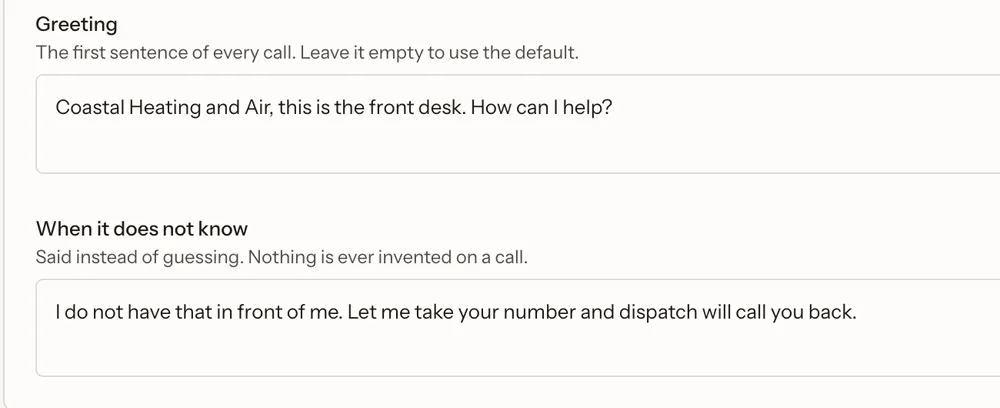
Our setup screen, shown with demo business data. We fill it in with you and make later changes for you; there is no customer login.
The greeting settings we review with you.
An AI receptionist for the calls you miss.
A small office between appointments. A service business out on a job. A team that needs help after hours.
Serving businesses around San Diego, Orange County and Rancho Santa Fe. It handles routine calls for law offices, other professional offices and home-service teams. DevX Voice is not offered for medical or dental practices.
Routine questions
Give callers your approved hours, services and answers. Questions outside that information become a request for your team.
Messages worth returning
It takes the caller’s name, number and request and emails the message to you. We test delivery with you during setup.
Appointments in Cal.com
It offers open times from your Cal.com calendar and books the one the caller picks. We connect and test the calendar with you.
Tell us about your number, your calendar and how many calls you get. We tell you plainly if it is not a good fit.
2
Set up your receptionist
In a setup session we write its answers from your business details, connect your Cal.com calendar and arrange forwarding or a new number.
3
Test together, then go live
Call it yourself. Check a booking and a message, try to trip it up, and only then send your customers' calls to it.
Before you decide.
What it supports, what it does not, and what we check with you.
Can it run on a Mac at my office?
Yes, on an Apple silicon Mac. Hardware, installation and support are quoted for you. We have not installed one at a customer office yet, so we talk it through with you first.
Does it actually book jobs, or just take messages?
Both. It can take a message with name, callback number, address and the problem, emailed to you. It can also book into a Cal.com calendar, which we connect for you at setup. It offers open times, writes the booking, then reads it back before telling the caller they're booked.
Does it work with Jobber, Housecall Pro or ServiceTitan?
Not yet. Bookings go into Cal.com and messages come to you by email, so for now you add the job to Jobber or Housecall Pro by hand. If you run everything inside Jobber, Jobber's own receptionist may suit you better.
What if a caller wants a real person?
It takes their name, number and what they need, reads the number back, and emails it to you straight away. It doesn't put calls through to your phone yet.
Will it make up prices or promise things I don't offer?
It is configured to use your approved business information and take a message when an answer is missing. AI can still make mistakes, so we test your setup with you and keep unsupported work out of the offer.
Does it tell callers it's not a person?
Yes. The greeting says it's the virtual receptionist, and it is set up not to claim to be a person.
Does it speak Spanish?
Not yet. It answers in English only.
Does it send text confirmations?
Not yet. Business texting needs a carrier registration that isn't finished, so it doesn't send texts yet. We'll say so here when it does.
Is it for medical or dental offices?
Not right now. Health care needs privacy work we haven't finished, so we do not offer it for medical or dental use.
Can I change what it says?
Yes. Send us the change by email or tell us on a call: the greeting, your hours, your answers to common questions or the prices it may quote. We make the change and test it before it answers your customers.
What happens if I go over 1,000 minutes?
Up to 1,000 minutes of calls a month. There are no overage charges. If you get close to the limit we contact you before you reach it.
Is there a contract or a setup fee?
$299 a month, month to month, with no contract and no setup fee; the setup session is included. Your plan renews automatically every month at $299 until you cancel. You can cancel at any time and you keep service to the end of the period you paid for.
Hear the receptionist for yourself.
Try the DevX Group LLC demo. Your own setup is tested before activation.